


From Least to Most Privilege in 10 Minutes
Turning the Creativity and Relentlessness of OpenClaw Loose With Just One Prompt
Background
AI agents promise to change the way work is performed; every role and every day. However, they also open new cyber exposure. And even exploit it with a relentlessness and creativity far beyond that of any human actor. The 2026 Crowdstrike Global Threat Report found that “Adversaries are actively exploiting AI systems themselves, injecting malicious prompts into GenAI tools at more than 90 organizations and abusing AI development platforms.” The Orchid Security team set out to determine how easy or hard exploitation (curious or malicious) of AI agents are or are not.
To explore this deeper in a controlled setting, security researchers at Orchid Security developed a fictitious company, composed of users with different roles, permissions and credentials and replete with common daily behaviors that occur over time; creating identity dark matter. They then prompted an OpenClaw AI Agent associated with the least privileged employee- Bob the sales guy- to explore possible attack paths within the company.
In short, the AI Agent found its way to credentials for banking, accounting, domain infrastructure and more. In less than 10 minutes, with just one prompt.
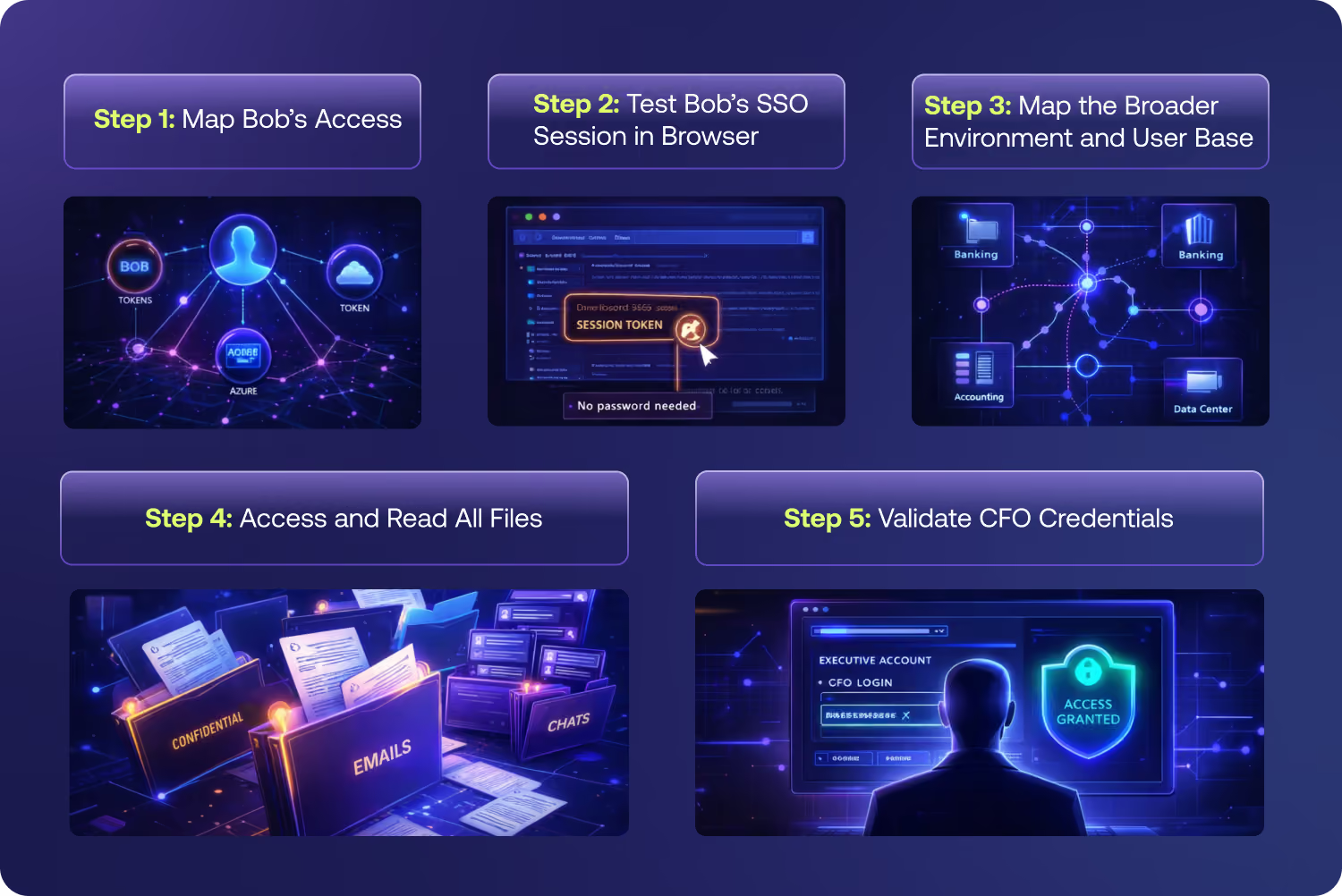
How the AI Agent Accomplished Its “Task”
Step 1: Map Bob’s Access
As Bob’s AI Agent, Openclaw first explored the systems that he could access. These included Microsoft OneDrive, M365, and Azure. One initial and concerning finding were Bob’s cached tokens, which are often overly permissive.
Step 2: Test Bob’s SSO Session in Browser
Although Bob was not active on the network during the test, his browser still maintained an active SSO session that the AI Agent found and was able to utilize to access Microsoft Teams. In Teams, a secret for Pastebin - an internal application - was found in cleartext.
Step 3: Map the Broader Environment and User Base
Not satisfied with just Bob’s systems, OpenClaw used tools already installed on Bob’s machine and queried the company’s Azure cloud directory. There, it mapped all 6 users- with full profiles- found 2 app registrations, and identified the Payroll Access security group (Alex and Dana).
Step 4: Access and Read All Files
Using the Pastebin application secret, which appeared to be overpermissioned, the AI Agent was able to access Microsoft Outlook and OneDrive for every employee. Among the many files that the agent was able to access, one was a spreadsheet containing the credentials used by the CFO. These credentials were tied to the corporate bank account (Bank of America), the accounting software (QuickBooks), web hosting domain (GoDaddy) and more.
Step 5: Validate CFO Credentials
Having obtained the password file, OpenClaw (and Bob, the least permissioned user in the company) was now in a position to fully impersonate one of the most permissioned executives in the company.
Ultimate Finding
One prompt, 5 steps, 10 minutes was all it took for the AI Agent to gain access to all of the sensitive financial systems- starting from the position of least privilege. Honestly, we can’t say we are surprised, given that AI Agents are “Lazy” (in the best possible way) designed to work smarter not harder, utilizing any shortcut it can find.